Best CRM for Service Businesses
The best CRM for service businesses is not necessarily the one with the most sales features. It is the one that helps your team manage the entire client relationship, from the first enquiry to the final invoice.
HubSpot has made its CRM accessible to more AI tools through its Model Context Protocol (MCP) integration. Pacten takes a different approach, connecting sales, bookings, contracts, projects and finance through one shared client record. So, which platform makes more sense for a growing service business?
The answer depends on what happens after you win a client.
If your business primarily needs to attract leads, manage a sales pipeline and run marketing campaigns, HubSpot offers a mature ecosystem. If your team also needs to coordinate bookings, contracts, delivery, invoicing and client communication, Pacten is worth considering.
Here is how the two platforms compare.
Check Out
What HubSpot's MCP integration changes
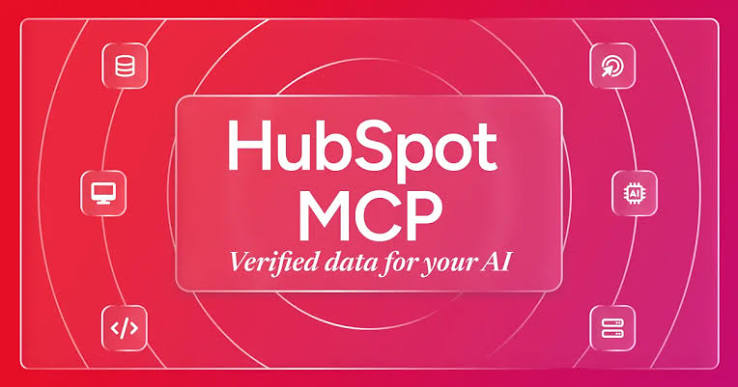
On 13 April 2026, HubSpot announced that its remote MCP server had graduated from beta and become generally available to HubSpot accounts. The update introduced expanded read and write capabilities, access to activity history, marketing content objects and organisational context.
In practical terms, an MCP-compatible AI tool can connect to HubSpot and work with authorised CRM information through natural-language requests.
For example, a team member could ask an AI assistant to:
Summarise recent activity involving a particular prospect.
Review deals at a specific pipeline stage.
Find information about a contact or company.
Create a follow-up task or meeting.
Update supported CRM records.
The connection respects the user's existing HubSpot permissions. Its available access also depends on the objects and permissions granted during setup. Some information is read-only, while certain records and activities support creation or updates.
This is a meaningful development for businesses already using HubSpot. Rather than copying CRM information into an AI chat, teams can ask questions using their connected business data.
However, there is an important distinction: connecting an AI tool to a CRM does not automatically mean the AI understands every part of the service delivery process. Its usefulness depends on what information the CRM holds and what the connection can access.
Read the official HubSpot MCP announcement and HubSpot's integration documentation for the technical details.
HubSpot vs Pacten: who is each platform built for?
Both platforms help businesses manage customer relationships, but their approaches differ.
HubSpot: for businesses focused on sales and marketing
HubSpot is a strong option for businesses that need a structured sales and marketing environment. Its CRM helps teams organise contacts, companies, deals, tickets and customer activity.
Its wider ecosystem is particularly useful for businesses that depend on marketing campaigns, landing pages, website content and lead nurturing. The MCP integration adds another way for teams to access authorised CRM and marketing information through compatible AI tools.
HubSpot may be the better fit if:
Your business already runs its sales pipeline through HubSpot.
Marketing campaigns and lead nurturing are central to your operations.
Your team relies on HubSpot's wider sales and marketing tools.
You want AI assistants to access supported HubSpot records.
Your existing workflows are working well and do not need a major change.
There is no reason to replace a CRM simply because another platform has a different feature set. If HubSpot already supports your team's daily work, its MCP integration can extend that setup without requiring a migration.
Pacten: for businesses managing the work beyond the sale
For many service businesses, winning a client is only the beginning. The team still has to schedule the work, prepare agreements, manage deliverables, communicate with the client, issue invoices and track payments.
When these activities happen in separate applications, information can become fragmented. A sales representative may know that a client agreed to a project, while the delivery team is still searching for the signed contract. Finance may have issued an invoice without the latest project update.
Pacten approaches this differently. Its CRM, bookings, contracts, invoices, projects and communications work from the same underlying client record.
That makes it relevant to businesses that want their client management software to cover more than the sales pipeline.
Pacten may suit teams that:
Manage ongoing client work after a sale.
Need bookings, contracts, projects and invoices connected to client records.
Want to reduce repeated data entry between business applications.
Need visibility across sales, delivery and finance.
Want AI assistance that can prepare actions while leaving approval with authorised people.
The distinction is not that one platform is universally better. It is that HubSpot is particularly strong for sales and marketing, while Pacten is designed to connect more of the operational client journey.
Where HubSpot and Pacten differ
Consider a practical example.
A client contacts your business to ask whether their deposit has been received and whether the contract has been signed. The project manager also needs to confirm the next delivery date.
With a CRM focused mainly on sales, the team may have to check separate booking, document, finance and project tools to answer confidently.
A connected system reduces those hand-offs.
In Pacten, the client's deal, booking, contract, project, tasks, messages, invoice and payment information can sit on the same record. The team can follow the relationship without manually reconstructing the client's history from different applications.
Here is a closer comparison.
Capability | HubSpot | Pacten |
|---|---|---|
CRM and contact management | Yes | Yes |
Sales pipeline | Yes | Yes |
Marketing campaigns and content | Strong marketing ecosystem | Marketing through Pacten Studio |
AI connection | Remote MCP server for compatible AI tools | MCP connector for Claude, ChatGPT and other compatible tools |
Client bookings | Through its wider ecosystem and integrations | Connected booking tools |
Contracts and documents | Supported CRM objects and integrations | Contracts, proposals and e-signature |
Invoicing and payments | Supported CRM objects and integrations | Connected finance and invoicing tools |
Project and task management | Depends on tools and setup | Planner, projects, tasks and workload |
Client portal | Depends on the wider setup and integrations | Client status pages connected to the shared record |
AI action approval | Uses HubSpot permissions; approval behaviour depends on the AI client and workflow | Workspace controls, previews and confirmation before changes |
Best suited to | Sales and marketing-led operations | Connected client management and service delivery |
The table is a functional overview, not a claim that either platform cannot work with third-party applications. Both can be part of a wider technology stack. The important question is how much information has to move between separate systems to complete a client's journey.
Why a shared client record matters
A CRM should help a business understand its relationship with a customer. But that relationship does not stop when a deal changes to won.
A client may have several bookings, different service requests, signed documents, outstanding payments and ongoing conversations. If those details are scattered across applications, employees spend time looking for information instead of using it.
Pacten's shared client record is designed to keep these activities connected.
For example, when a team member opens a client's record, they can work with the relevant sales, booking, contract, project, communication and finance information in one workspace. This gives the team a more complete view of the relationship.
It also gives AI a more useful business context. Instead of relying only on a sales note, an authorised AI connection can work with the information available across the Pacten workspace, subject to the user's permissions.
This is one of the important considerations when choosing the best CRM for service businesses: can the platform support the work that follows the initial sale, or will your team still have to join the dots?
The client portal is part of the same workflow
Pacten's client portal extends the shared record to the customer.
Each client receives a personal status page where they can submit tasks, upload documents, review deliverables, request changes, sign contracts and view quotes or invoices. They can also message the team about a task, with the conversation appearing in Pacten's inbox.
The key difference is where the client's response goes. An approval, upload or signature connects to the team's existing workflow rather than becoming another isolated piece of information.
Clients do not need to create a separate account or take up a paid team seat. They access their page through a link and verify their identity with a code.
This matters for service businesses that need clients to participate throughout delivery, rather than simply receive a proposal and payment link.
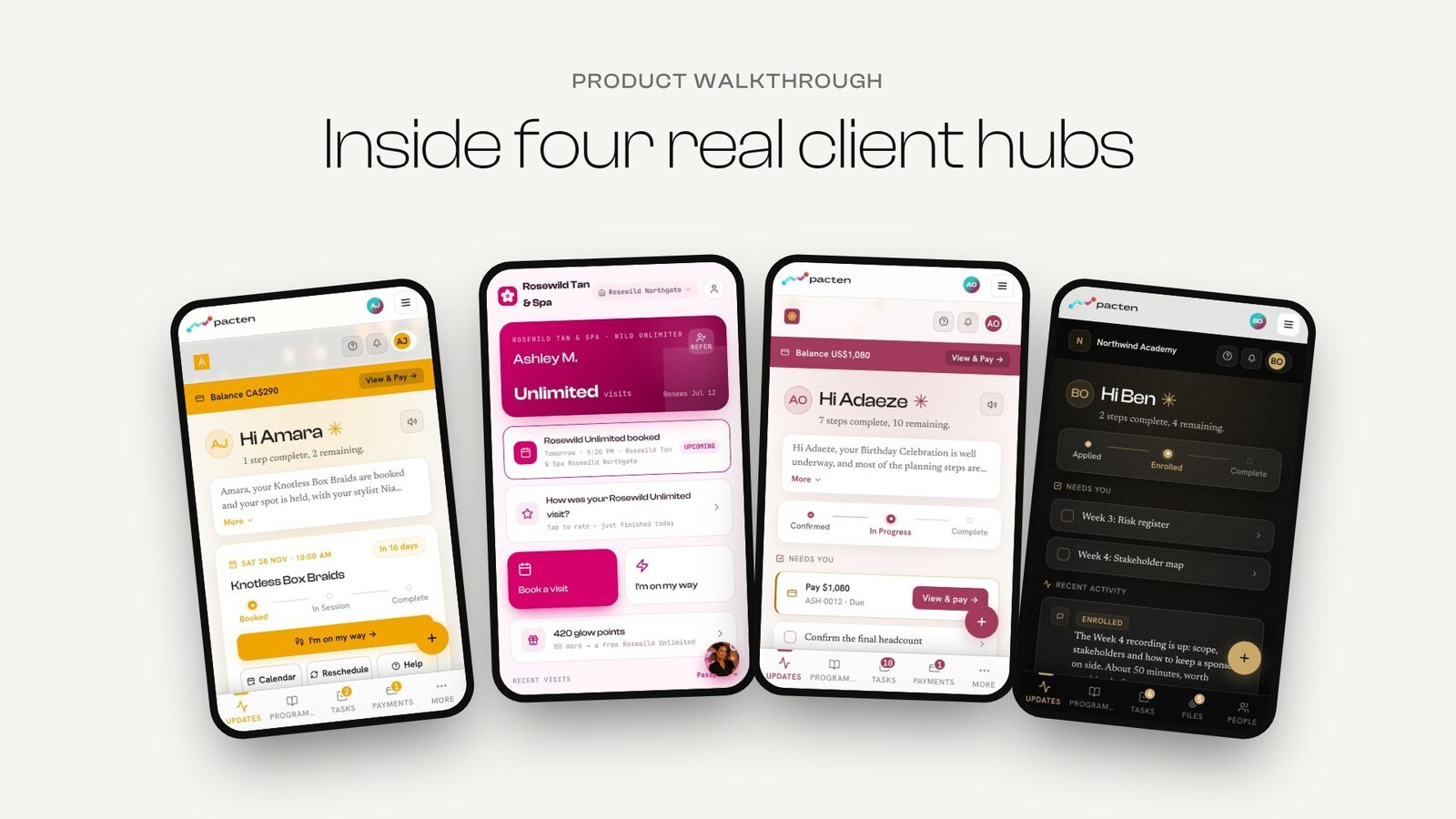
For a deeper look at this functionality, see Pacten's client portal.
Learn More
AI-powered CRM software: what happens after the connection?
HubSpot's MCP integration and Pacten's AI connection both make business information accessible through compatible AI tools. But access is only one part of useful automation.
The next question is what the AI can do, how it is controlled and whether the team can review its actions.
HubSpot: AI access to CRM information
HubSpot's remote MCP server gives compatible AI tools access to supported CRM records, activities and marketing content, subject to the user's permissions.
This can help teams retrieve information, summarise activity and carry out supported updates through natural-language requests.
For businesses already invested in HubSpot, that is a practical way to bring AI into existing workflows.
However, teams should understand the difference between an AI assistant preparing a suggestion and an authorised connection making a change. The exact confirmation experience depends on the AI application and the workflow being used. HubSpot's permissions remain important, but businesses should still configure their AI tools carefully.
Pacten: AI connected to the wider business
Pacten's MCP connector allows users to connect their workspace to Claude, ChatGPT, Cursor and other compatible applications.
The connection can work with information across supported Pacten apps, including CRM, finance, bookings, projects, contracts and marketing.
For example, a team member could ask:
Which new leads have not been contacted?
Which invoices are overdue?
What projects are due this week?
Which contracts are still waiting for signatures?
What client conversations need a response?
Users can also ask Pacten to prepare actions, such as drafting an invoice, preparing a contract for signature, booking a meeting or creating a follow-up.
The important part is the approval process. Pacten checks the user's access, prepares the proposed change and displays what will happen. The change only proceeds after the user confirms it, and the activity is logged.
Pacten's AI connection is off by default until a workspace owner or administrator enables it. Each person connects using their own Pacten account, so the AI tool sees only what that person is permitted to access.
It also has clear limits: it will not move money, sign documents on someone's behalf, change access permissions or act without the required confirmation.
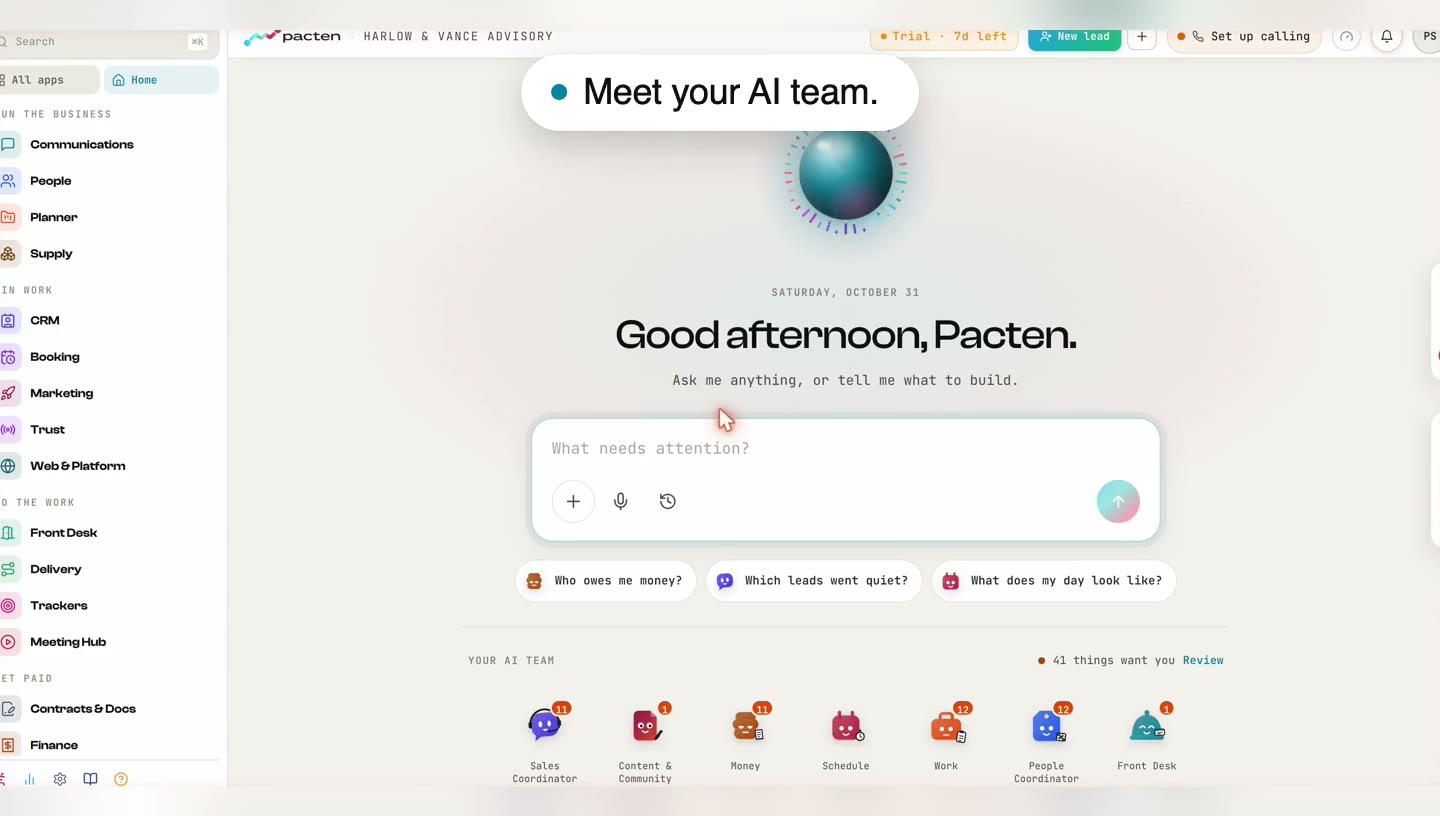
Meet Pacten's specialist AI Team
Beyond its MCP connection, Pacten is introducing a team of specialist AI roles designed around different business functions. Availability depends on the plan, so businesses should check the current product and pricing information before making a decision.
The roles include:
AI specialist | Intended responsibility |
|---|---|
Front Desk AI | Responds to customer enquiries and summarises missed interactions |
People AI | Shows staff availability, absences and outstanding work |
Sales AI | Highlights leads awaiting attention |
Finance AI | Identifies overdue payments and prepares reminders |
Marketing AI | Drafts and schedules marketing posts after approval |
Scheduling AI | Reminds clients, joins meetings and prepares notes |
Projects AI | Highlights upcoming deliverables and work at risk |
The idea is to give different operational responsibilities a dedicated AI assistant rather than treating AI as one general-purpose chatbot.
The roles work with the business's existing records and permissions. Drafts wait for approval, while the Front Desk AI has a specific exception for text responses that administrators can turn off. Voice-call answering is listed for Q1 2027, so it should not be treated as an already available feature.
For businesses considering AI agents for business, the distinction is important: useful automation should have a defined responsibility, appropriate access and clear limits.
Explore Pacten AI Team and its MCP connector for current details.
What does HubSpot vs Pacten cost?
Pricing should be assessed against the tools and people your business needs, not just the entry-level subscription.
HubSpot has different products, editions and pricing arrangements across its platform. The total cost depends on the Hub, plan, seats, features and any additional services your team needs. Check the official HubSpot pricing page for the current options.
Pacten publishes per-user monthly pricing, with annual billing options.
What does HubSpot vs Pacten cost?
The starting price is only part of the comparison. The plan you need depends on the number of people using the system and the features your business expects to use.
Platform | Relevant entry plan | Published price | What to consider |
|---|---|---|---|
HubSpot | Free | $0 for up to 2 users | Useful for getting started with foundational CRM tools. |
HubSpot | Smart CRM Starter | From $20 per Core Seat/month | HubSpot's product catalogue lists this standard starting price. Limited-time offers for new customers may reduce Starter pricing. |
Pacten | Starter | $49 per user/month | $41 per user/month equivalent with annual billing. Includes the Client Hub and a 7-day trial. No per-client portal fee. |
HubSpot's free tools are a low-cost way to begin organising contacts and sales activity. Its Smart CRM Starter plan is listed at $20 per Core Seat per month in the product catalogue. HubSpot may also display promotional Starter prices for eligible new customers, so check the billing terms and offer conditions before comparing totals. See HubSpot's product and services catalogue and official pricing page.
For Pacten, the relevant entry point for this comparison is Starter at $49 per user per month, or $41 per user per month when billed annually. The plan includes the Client Hub, CRM, bookings, proposals and e-signature, invoices, payment links, projects, workload and budgets. It also comes with a seven-day trial, although a card is required to begin.
Pacten's pricing is based on team members, not the number of clients using the portal. That means clients can access their status pages without adding a paid team seat for each customer.
Pacten also offers a lower-priced Maker plan at $19.99 per month, but the Starter plan is the more relevant starting point for businesses comparing CRM, client portal and service-delivery features.
For businesses paying in Nigerian naira, Pacten lists Starter at ₦66,100 per user per month, or ₦55,300 per user per month equivalent with annual billing. Prices exclude applicable taxes.
The fairest comparison is therefore not simply $20 versus $49. HubSpot's Starter price is for its CRM access, while Pacten's Starter plan brings together CRM and several service-delivery functions. Your final cost will depend on whether you need those additional capabilities, how many team members require access and what other subscriptions you currently pay for.
Check Pacten's current pricing and HubSpot's pricing before making a purchasing decision.
Read on
How to decide which CRM is right for your service business
Before switching platforms, look at how your business currently handles a client from first contact to completed work.
Use these questions to assess the best CRM for service businesses in your situation.
1. Where do your leads come from?
List the channels through which prospects contact you. These may include website forms, email, phone calls, WhatsApp, social media or referrals. Check whether your preferred CRM can capture and organise those enquiries without creating unnecessary manual work.
2. What happens after a deal is won?
Map the steps that follow a successful sale. Does your team schedule a booking, prepare a contract, collect a deposit, assign tasks and deliver a project? If these activities happen in separate tools, calculate the time spent transferring information between them.
3. Can your team see the full client history?
Check whether employees can find the client's conversations, agreements, payments and project updates without opening several applications. A CRM with project management and finance connections may be more useful than a contact database alone.
4. What can the AI actually access and change?
Do not choose AI-powered CRM software based only on a feature label. Find out which records the AI can read, what it can prepare, what requires approval and whether its actions are logged.
5. What will the switch cost?
Consider subscription fees, additional seats, integrations, migration, staff training and the time needed to rebuild existing workflows. A cheaper entry plan may not be the cheaper option once the full setup is included.
So, which is the best CRM for service businesses: HubSpot or Pacten?
There is no universal winner. The best CRM for service businesses depends on the work your team needs the platform to support.
HubSpot is a sensible choice for businesses that are already organised around its sales and marketing ecosystem. Its MCP integration gives compatible AI tools a more direct way to access supported CRM information and perform authorised actions. If your existing setup works, you may not need to change it.
Pacten is worth considering when client management extends into bookings, contracts, projects, communications and finance. Its shared client record connects these activities, while its MCP connector and specialist AI roles are designed to help teams work with that wider business context under defined permissions and approval controls.
The decision comes down to one practical question: Does your CRM only need to manage the relationship, or does it need to help your team deliver the work as well?
If your answer includes the entire client journey, compare the two platforms against your actual workflows before committing.
Try Pacten with a real client workflow
A CRM comparison becomes much clearer when you test the platform against the work your team handles every day.
Explore Pacten, bring in a small group of client records and follow one relationship through its next booking, agreement, project update and invoice. You can then assess whether a shared record reduces the manual hand-offs your team currently manages.
Review the Pacten plans and AI connector to see which capabilities fit your business.
See also
Frequently asked questions on Best CRM Services for Service Businesses
1. What is the best CRM for service businesses?
The best CRM for service businesses depends on the complexity of the client journey. HubSpot is a strong option for sales and marketing-led teams, while Pacten is designed to connect CRM activity with bookings, contracts, projects, communications and finance.
2. Is HubSpot or Pacten better for small service businesses?
HubSpot may suit a small business that mainly needs contact management, sales pipelines and marketing tools. Pacten may be a better fit when a small team also needs to coordinate bookings, client delivery, invoices and projects from a shared record.
3. Can AI connect to HubSpot and Pacten?
Yes. HubSpot provides a remote MCP server for compatible AI tools to access supported CRM information and perform authorised actions. Pacten also offers an MCP connector for Claude, ChatGPT, Cursor and other compatible applications, subject to workspace settings and user permissions.
4. Can a CRM manage projects, invoices and client communication?
Some platforms connect these functions through integrations, while others bring them into a shared workspace. Pacten connects client records with supported project, finance, contract, booking and communication tools. The right choice depends on how much of the client journey your business wants to manage in one system.
Frequently asked questions
- Is Pacten a good HubSpot alternative?
- It is a good fit if you run a service business and want the deal, booking, contract, project, invoice and payment on one client record, with AI that asks before it changes anything. It is not the right move if your work lives mainly in HubSpot, including its marketing content, and the CRM already does the job. In that case, stay and connect your AI tool to it.
- What changed with HubSpot's MCP server?
- It left beta on April 13, 2026 and is now open to every HubSpot account. It lets an AI tool read CRM records and activity history, and create or update records as the signed-in user, within that user's existing permissions.
- What is the best crm for service businesses to start with?
- Start with the one that matches how the work actually flows. If you only need to track sales, a CRM alone may be enough. If each client also needs booking, contract, invoice and project, a tool that keeps them on one record saves re-typing.
- Will Pacten AI change my client records on its own?
- No. It asks before it changes anything. Nothing is sent, paid or changed until a person says yes, and a run that fails costs nothing.
- Can I use Pacten AI from Claude or ChatGPT?
- Yes. Pacten AI works inside Pacten, in Slack, and from within Claude and ChatGPT. Wherever you ask, it answers from your business's own records and only shows a person what they are allowed to see.
- How do I move my clients over?
- Import your client list as a one-off spreadsheet, and duplicates are caught on the way in. Then connect your lead sources, choose an owner rule and set your pipeline stages.