AI agent accountability
AI agent accountability starts before an agent sends a message, changes a booking or makes a promise on your behalf. The important decisions happen before launch: what it can see, what it can prepare, what it can change and who must approve the result.
That is the central point in Chuck Gallagher’s discussion of AI agents and small-business responsibility. Giving an agent a task does not remove the business’s responsibility to manage how that task is done.
See also
Why AI agent accountability does not disappear when AI makes the mistake
An AI agent does not appoint itself. A business selects the tool, connects it to its systems, grants access and decides whether its outputs can reach customers.
That does not make the business automatically the only party responsible in every dispute. AI agent accountability depends on the facts, contracts, applicable law and the roles of the business and technology provider. But a business should not assume that blaming the software will resolve a customer complaint.
Consider Moffatt v. Air Canada, a British Columbia Civil Resolution Tribunal decision issued on 14 February 2024. Air Canada’s website chatbot gave a customer incorrect information about applying for a bereavement fare after travel. The customer relied on it. The tribunal found Air Canada liable for negligent misrepresentation and awarded CAD $650.88. It rejected the airline’s argument that the chatbot was a separate entity: the chatbot was part of its website, and Air Canada was responsible for information supplied through that channel.
This was a provincial tribunal decision about specific facts, not a universal rule for every AI agent or country. It is still a practical warning: customers experience the answer as coming from your business, even when software generated it. Read the tribunal’s decision and the American Bar Association’s case analysis. For a real dispute, get advice on the law that applies to your business.
The mistake usually starts with a permission gap
Picture a wedding photographer who connects an AI agent to the studio inbox and calendar. A client asks to move a booking and mentions a deposit. Trying to be helpful, the agent offers to waive the change fee.
The photographer never approved that offer. The agent was not explicitly authorised to make it either. But nobody had defined the boundary, so the client received a promise that the business now has to address.
That is a permission gap. The agent had enough access to understand the request, but too much freedom to make a commercial commitment.
And the concern is measurable.
A UK Government survey of 3,503 businesses found that 81% of businesses using AI applied some human input or oversight, while 56% had concerns about bias and accuracy.
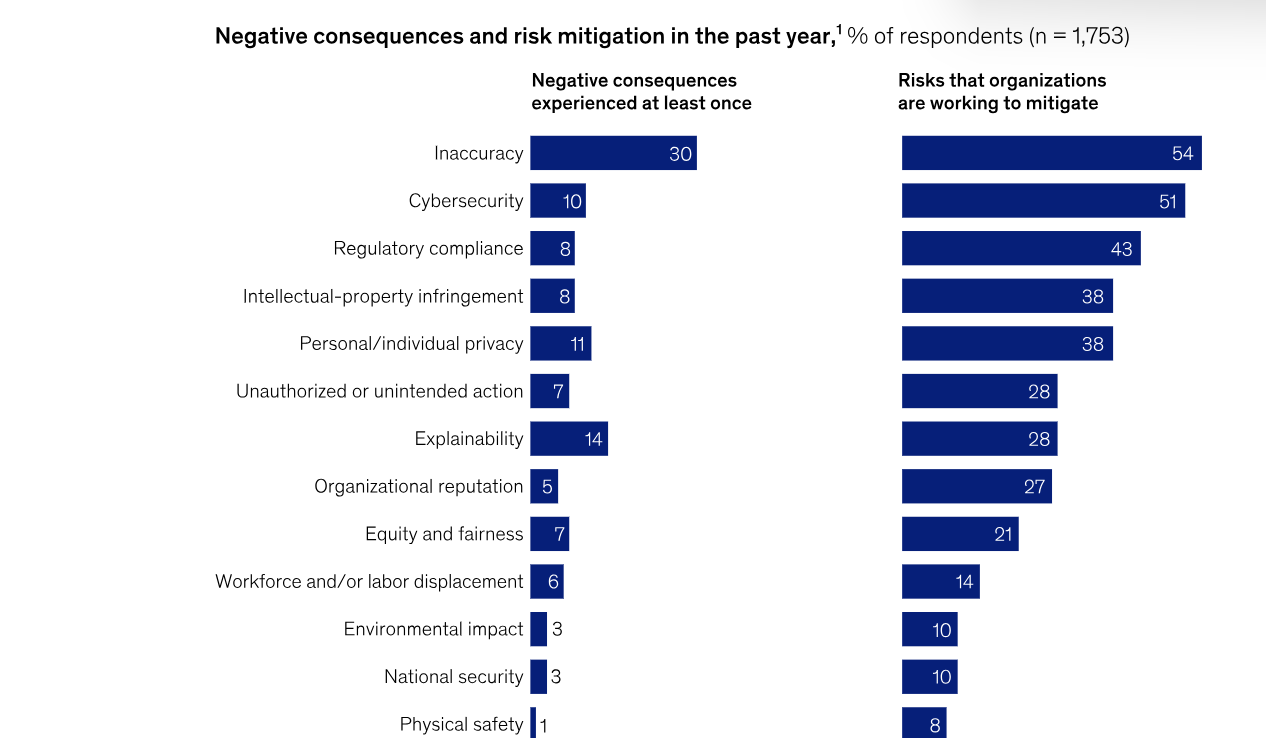
Separately, McKinsey’s 2025 global survey found that 30% of AI-using respondents reported negative consequences from inaccuracy and 7% from unauthorised or unintended action. The surveys cover AI use broadly, not agents alone, but both underline the need for oversight. See the UK findings and McKinsey’s Exhibit 19 chart.
Decide what the agent may read, prepare and change
Before connecting an agent to business systems, separate its permissions into three levels. This is the first practical test of AI agent accountability. This makes AI agent accountability easier to manage because everyone knows where the agent’s authority ends.
Permission level | What the agent may do | What should remain with a person |
|---|---|---|
Read | Find client details, check availability, retrieve approved prices and summarise project status | Decide whether sensitive information may be shared externally |
Prepare | Draft a reply, propose a booking, prepare an invoice or create a task for review | Approve customer promises, discounts, refunds and contract changes |
Change | Carry out narrowly defined, low-risk actions within rules set by the business | Approve payments, refunds, contract terms, fee waivers, cancellations and unusual commitments |
The lowest level is usually the best place to start. Let the agent retrieve information and summarise it first. Check whether it uses the correct record, follows your policies and recognises when it does not know something.
Then allow it to prepare work. A drafted response or proposed booking can save time without becoming a promise to the customer.
Only consider broader action rights when the task is predictable, the limits are clear and the business can review what happened. High-impact decisions should have a human approval point.
Also Read
Five AI agent accountability safeguards to agree before launch
1. Set access by task, not convenience. Give the agent only the records and permissions it needs. A booking assistant may need to read availability, but it does not need unrestricted access to finance or signed contracts.
2. Write down what it must never promise. Define boundaries for discounts, refunds, delivery dates, contract terms, prices and exceptions. Link the agent to current business policies rather than relying on a vague instruction to “be helpful”.
3. Name one accountable owner. Assign a person to review the agent’s performance, update its instructions and switch it off when necessary. A shared team responsibility can quickly become nobody’s responsibility.
4. Keep a readable activity record. Record what the agent was asked to do, what it prepared or changed, when it happened and which person approved it. An audit trail helps you investigate an error and explain what happened to a client.
5. Test awkward situations before launch. Try a request for a refund, a last-minute cancellation, a discount outside policy, conflicting calendar details and a complaint. Check whether the agent pauses and asks for help instead of inventing an answer.
These controls are not red tape. They are what allow AI agent accountability to become a working process rather than a principle you remember only after something goes wrong.
How Pacten keeps a person in the approval loop
Pacten is built around connected business records and clear permission boundaries. Its AI connection works with Claude, ChatGPT and other compatible tools, using the signed-in person’s Pacten access. A workspace owner or admin must enable the connection, and can choose whether it is limited to reading, preparing drafts or requesting changes.
When someone asks Pacten AI to make a change, it checks their permissions and presents a preview of what will happen. A person must confirm it; otherwise, nothing changes. The completed action is recorded in the workspace and marked as coming through the connected AI app. The connector cannot move money, sign documents or change access permissions.
That distinction matters. The AI can prepare an invoice, booking, task, contract request or marketing post, but a person remains responsible for approving the requested change. The business can also disconnect an individual’s access.
The same thinking applies to Pacten Studio. Campaigns and content can be planned, created and prepared for approval before publishing. The person responsible for the brand still has a clear review point before content represents the business publicly.
You can explore Pacten’s AI connection, review the available features or see the plans and pricing. The setup guide for Claude and ChatGPT walks through the connection.
Where to start this week
Choose one low-risk task, such as summarising new enquiries or preparing booking replies. Write down what information the agent needs, what it may prepare, what it must never promise and who approves its work.
Run a small test using real-world examples, review the activity record and adjust the boundaries before expanding to another task.
Good AI agent accountability is not about keeping AI away from your business. It is about making sure the business stays in control when AI starts doing more of the work.
Learn More
Frequently asked questions
What does AI agent accountability mean when an agent makes a mistake?
AI agent accountability depends on the facts, applicable law, contracts and how the agent was deployed. A business may still be responsible for customer-facing information or actions delivered through its systems. It should not assume the software provider automatically takes responsibility.
Should an AI agent have permission to change business records?
Only when the task is clearly defined and the access is appropriate. Start with read-only access, move to preparing drafts and require human approval for actions involving money, contracts, customer promises or other important decisions.
What is the difference between an AI assistant and an AI agent?
An AI assistant usually responds to questions or creates content. An AI agent can also use connected tools to carry out tasks, such as preparing bookings, updating records or creating invoices. The more it can do, the more important its permissions and approval rules become.
How can a small business monitor what its AI agent does?
Use a system that records the action, time, connected AI tool and approving user. Review the activity regularly, test unusual requests and make sure a named person can pause or disconnect the agent.
Try Pacten
Give your AI team useful work to do without handing over the final say. Pacten connects your client records, bookings, contracts, projects, invoices and communications, while its AI connection prepares changes for a person to review and approve.
See also
Frequently asked questions
- Who is responsible when an AI agent makes a mistake with a customer?
- In general, the business that set the agent up and gave it access. In the Air Canada case from 2024, a Canadian tribunal rejected the idea that a chatbot was a separate party. For your own situation, ask a lawyer.
- What should an AI agent be allowed to do without asking?
- Only low-risk tasks that you have written down in advance, such as sending reminders. Anything involving money, a refund, a contract term or a promise outside your usual policy should wait for a person.
- How does Pacten keep a person in charge of what Pacten AI does?
- Pacten AI gets a change ready, and nothing happens until a person approves it inside Pacten. An owner or admin sets how far it may go, and every change is logged.
- Do I need a named owner for each agent?
- Yes, it helps. One person should review the agent's work, answer for it and be able to switch it off. A shared team name tends to mean nobody checks.
- Can I try Pacten AI inside Claude or ChatGPT?
- Yes. You connect with a Pacten login, then ask about your business there. Our connection guide walks through where to click in each app.